You know that feeling when your CI pipeline takes so long that you start questioning your life choices? Yeah, we were there. 60+ integration test suites, a 2-hour timeout, and an infrastructure change that halved our available compute. Something had to give.
This is the story of how we went from “pipeline consistently timing out” to “pipeline consistently passing” using an idea inspired by classic scheduling algorithms, a controversial decision to stop cleaning up after ourselves, and a painful lesson about why “just reuse it” is never as simple as it sounds.
The Setup
Picture this: you have a big application. It runs as a cluster of VMs on OpenStack, think 2-4 worker VMs, a controller VM, maybe some load balancer VMs. Each test suite needs its own fresh deployment. You have ~60 suites to run, each taking 15-40 minutes, and they need different “flavors” of deployment (some need 2 workers, some need 4 workers + 3 load balancers).
You have a pool of test hosts across 2 clouds. Each deployment eats some vCPUs from the cloud. You can run maybe 15-20 deployments in parallel before the cloud runs out of resources.
The scheduler’s job: assign suites to hosts, track available vCPUs, don’t overcommit, and finish everything within 2 hours.
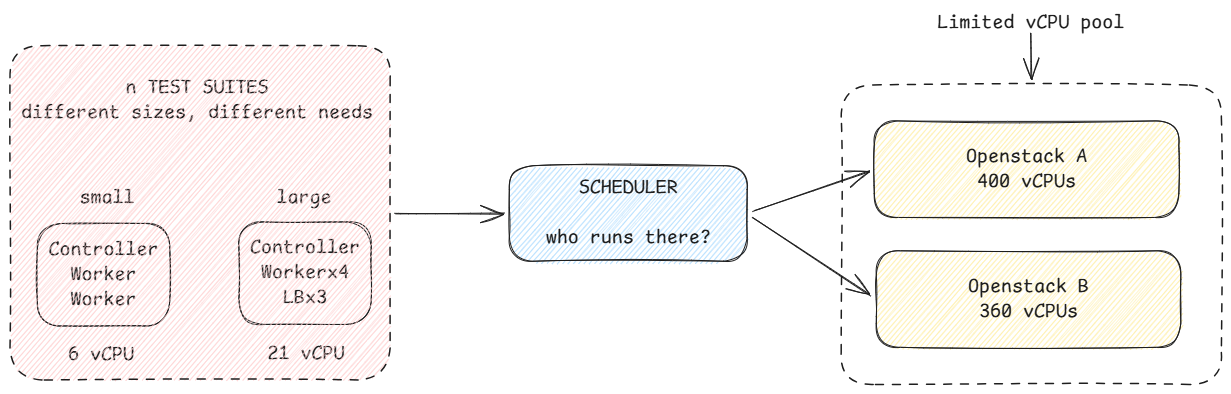
We had this working fine. Then one of our clouds went down for maintenance, replaced by a weaker one. Suddenly we could only run 8-10 suites in parallel. And everything started timing out.
Part 1: The 5-Line Fix That Shouldn’t Have Worked This Well
Here’s the thing about our scheduler.. it processed suites in the order they appeared in the config file. Which was alphabetical. By suite name.
So the schedule looked like:
a_suite (17 vCPUs) → runs immediately
b_suite (6 vCPUs)  → runs immediately
c_suite (10 vCPUs) → runs immediately
...
r_suite (21 vCPUs) → position 46 of 59 → sits in the queue for 70 minutes
v_suites (17 vCPUs) → position 58 → also waiting forever
The heaviest suite which needs the most resources and takes the longest was stuck at position 46 because its name starts with ‘r’. By the time enough resources freed up for it to start, there were only 20 minutes left on the clock. It would run alone at the end while all other hosts sat idle. Classic “long tail” problem.
The fix? Sort by resource weight descending before scheduling:
def sortedBuilds = downstreamBuilds.sort { a, b ->
    cpuWeight(b) <=> cpuWeight(a)
}
5 lines. That’s it.
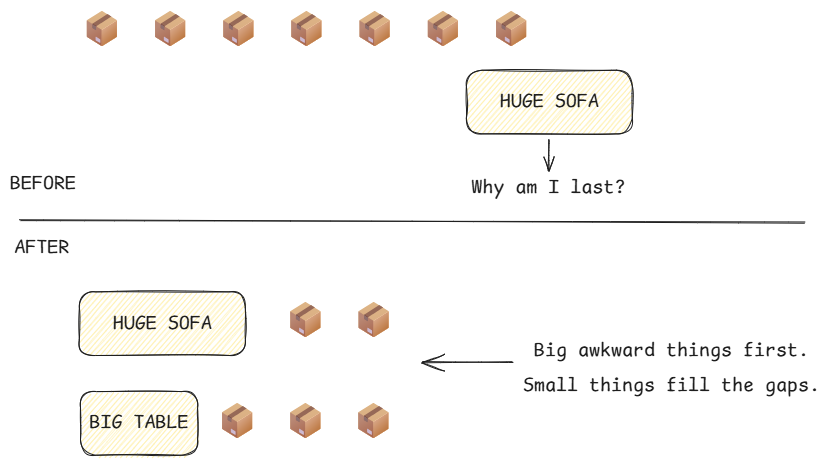
Why it works: The scheduler already handled the case where a job doesn’t fit, it skips it and tries the next one. So putting heavy jobs first means they grab resources while the pool is full. Light jobs (6 vCPUs) can fill any tiny gap left over. At the end of the run, you have many small jobs finishing together instead of one whale running alone.
This is similar in spirit to classic list-scheduling heuristics like Longest Processing Time First (LPT), except we’re sorting by resource demand rather than execution time. In our case, vCPU weight was a useful proxy for which suites were hardest to fit into the schedule.
Result: Pipeline went from consistently timing out to occasionally passing. Not perfect, but the heaviest suites were no longer the tail bottleneck.
Part 2: “What If We Just… Don’t Delete Things?”
Each suite’s lifecycle looked like this:
Create deployment (10 min) → Run tests (20 min) → Delete deployment (2 min)With 60 suites on 15 hosts, that’s roughly four rounds per host. Without reuse, every round creates a fresh deployment. If consecutive suites could reuse the deployment already on a host, we’d avoid roughly three creations per host:
15 hosts × 3 avoided creations × 10 min = 450 minutes
That’s 450 minutes of aggregate work across all hosts. Because those creations happen in parallel, it doesn’t translate to 450 minutes of wall-clock time, but spread across the scheduling waves, it represented roughly 30 minutes of potential pipeline savings.
The obvious question: if Suite A and Suite B both need a “2 worker” deployment on the same host, why delete and recreate between them?
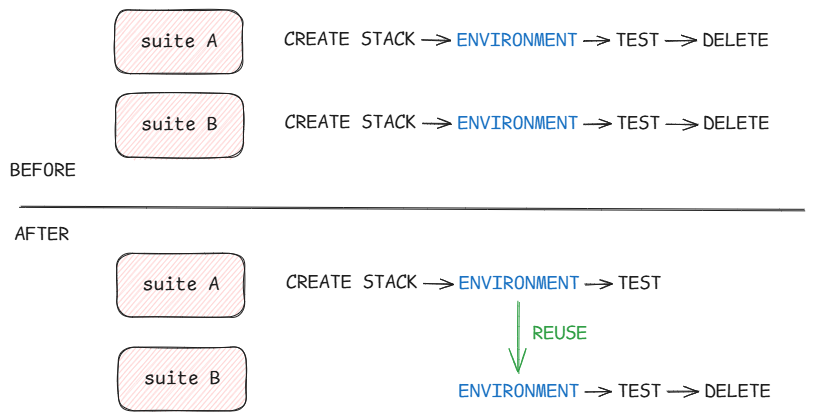
The implementation was straightforward:
After each suite, write a small JSON file recording what deployment type is on this host
Before the next suite, read the file. Same type? Skip creation. Different type? Recreate.
At the end of the pipeline run, clean up all remaining deployments.
Sounds great on paper. And for about 80% of suites, it worked perfectly. The remaining 20% exposed all the assumptions we’d made about what “reusable” actually meant.
Part 3: Why “Healthy” Doesn’t Mean “Fresh”
The first version was simple: if the deployment matches, just check if the controller VM’s management port is reachable. If yes, reuse. If no, recreate.
if ssh $CONTROLLER "exit 0"; then
    echo "Stack is healthy, reusing"
    exit 0
fi
# Fall back to recreate
Problem #1: Dead workers. The controller was fine, but a worker VM had crashed between runs. Test starts, tries to talk to the worker, fails. Validation missed it.
Fix: Add a cluster health check - SSH to controller, query cluster status, verify all nodes are ENABLED.
Problem #2: 35-minute hangs. The validation passed, but the “setup network” step after validation tried to SSH to each worker. If a worker was in a weird half-dead state (responds to cluster status query but not SSH), it would retry forever.
Fix: Move the cluster health check BEFORE the network setup. Fail fast.
Problem #3: The “everything looks fine but isn’t” case. Cluster says all nodes ENABLED. SSH works. Network setup passes. Then the test starts, tries to restart a VM as part of a failover test, and OpenStack says “can’t start an instance that’s already running” (HTTP 409). Which… is correct, the VM IS running.
The problem wasn’t that the environment was unhealthy. It was that the test framework assumed it was starting from a freshly created environment.
That distinction turned out to matter a lot: healthy does not mean equivalent to fresh.
Fix: Hmm.
Problem #4: Stale configuration. The previous suite configured the application for its specific test scenario (custom DNS settings, special routing rules, measurement profiles enabled). Our suite’s init function tries to delete all config and start fresh, but it can’t delete objects that are in ENABLED state. It fails silently, and tests run against wrong configuration.
Fix: Add explicit “disable everything” before the config reset. But this is whack-a-mole - every new object type that can be enabled needs handling.
Problem #5: Failover tests timeout. The test stops a worker VM, waits for failover, restarts the VM, waits for it to rejoin the cluster. On a fresh deployment, rejoin takes 50 seconds. On a reused deployment (that’s been running for a while with accumulated state), it takes 80 seconds. The test’s timeout is 75 seconds. Boom.
We initially blamed reuse. But the same test on another reused host completed in 40 seconds. Reuse hadn’t created the problem, it had exposed timing variance that was already there. Our 75-second timeout was simply too tight.
Part 4: The Spectrum of Cleanliness
After several weeks of fixing edge cases, we realized there’s a spectrum:
← FAST                                               SAFE →
skip       reboot      cluster-restart      rebuild      recreate
(5 sec)    (2-3 min)   (~1 min)             (2-4 min)   (10-12 min)
validate   restart OS  restart app+cluster  fresh disk   fresh everything
only       keep disk   keep disk            keep network new network too
Each step to the right fixes more edge cases but costs more time:
- Skip: Just validate. Fast but fragile. Any accumulated state can bite you.
- Reboot: Restarts the OS, but disk persists. Config files on disk survive, so app reloads the same stale config.
- Cluster restart: Restarts the application cluster services. But if config is persisted on disk, it gets reloaded.
- Rebuild: Reinstalls the OS from the original image. Fresh disk, fresh processes. Only keeps network identity (IPs, ports).
- Recreate: Deletes everything including network resources and creates from scratch. The gold standard. The slow standard.
The interesting insight: for clustered applications that persist config on disk, rebuild is the minimum level that guarantees clean state. Anything less requires the test framework to actively clean up after itself - which is an endless game of whack-a-mole.
Part 5: Lessons Learned (the Hard Way)
1. Sort your jobs. Seriously.
It’s embarrassing how much impact a 5-line sort had. If parallel CI jobs compete for a shared resource pool, scheduling the hardest-to-fit jobs first can dramatically reduce the long tail. In our case, sorting by vCPU requirement worked well: large deployments grabbed capacity while it was still available, and smaller ones naturally filled the gaps later.
It’s not globally optimal, but it was cheap, simple, and gave us most of the improvement.
2. Reuse is a spectrum, not a boolean
“Should we reuse test environments?” isn’t a yes/no question. It’s “how much cleanup can we skip before things break?” And the answer depends on your application’s statefulness.
Stateless containers? Skip everything, just health check. Stateful VMs with on-disk config? You probably need rebuild. Clustered systems with complex initialization? You might need recreate, sorry.
3. Validation can never be complete
We kept adding checks: is the port open? Are all nodes ENABLED? Is disk space OK? Are services ready? But there’s always another thing. The HTTP 409 issue taught us: even if everything LOOKS healthy, the system might be in a state where certain operations (like restarting a running VM) behave differently than on a fresh system.
Instead of asking “is it clean enough?”, ask “can we MAKE it clean cheaply?”
4. Fix at the right layer
We spent weeks adding validation scripts to the CI infrastructure. The actual fix for most issues was 46 lines in the test framework - explicitly disabling things that block config cleanup. The CI infrastructure shouldn’t need to know about your application’s config model.
5. Measure before optimizing
Our first optimization which is sorting suites by resource weight gave us 15–25 minutes of improvement with 5 lines of code. Our second “optimization” (environment reuse) required 500+ lines, multiple iterations, several production incidents, and gives ~10 minutes when it works. Know your ROI.
6. The cloud is not your friend
The same test on the same host with the same deployment type can take 50 seconds one run and 80 seconds the next. OpenStack (or any cloud) introduces variance that tight timeouts can’t handle. Design for it.
The Current State
After all this, our pipeline: - Sorts heavy suites first (5 lines) - Reuses environments for same-type consecutive suites (skip mode) - Validates cluster health before reuse - Falls back to full recreate on any failure - Has the test framework explicitly handle stale config cases
It now passes consistently with a 90-minute average, down from runs that regularly hit the 120-minute timeout. Most of that improvement came from five lines of scheduling logic. Environment reuse saves another ~10 minutes when it works, but at roughly 10x the implementation complexity.
Was reuse worth it? Probably. But if I were starting again, I’d optimize in exactly this order: fix the schedule first, measure what’s left, and only then consider reusing stateful environments.
The boring optimization gave us most of the win. The clever optimization gave us most of the bugs.
This post describes general CI/CD optimization techniques applied to a multi-VM integration testing pipeline on OpenStack. The specific patterns: resource-aware scheduling, environment reuse, and validation strategies are applicable to similar setups.